
KDP cover template generator with spine calculator
Enter your trim size, page count and paper. It works out the spine and full cover size, then lays out the back, spine and front on one print-ready page. Built for text-led covers on puzzle, activity and notebook books. Free to make and preview; clean files with a commercial licence come with DT Labs Membership.
No card. Runs in your browser. Export a print-ready PDF with spine, bleed and barcode area set; free exports carry a watermark, clean files come with DT Labs Membership.
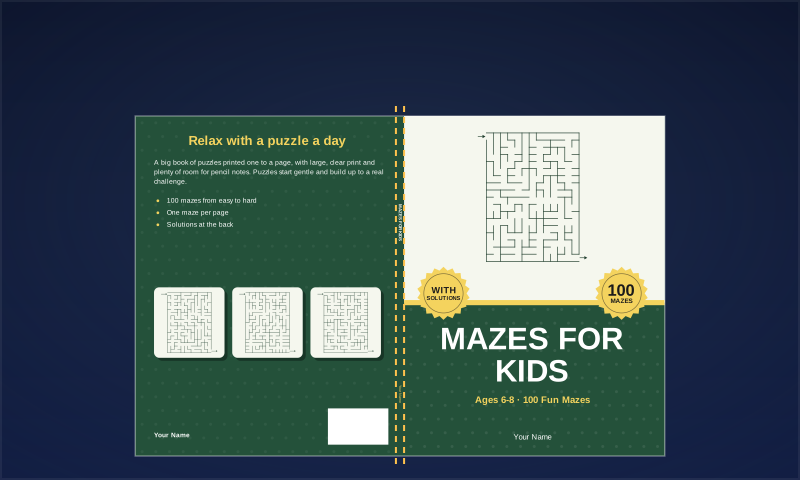
What does this KDP cover template generator make?
One finished cover file sized to your book, not a blank outline. The back, spine and front sit on a single page with bleed included, and the title, subtitle, author, back text and barcode area are placed for you.
- Full wrap for paperbacks, front cover only, or a 1600 × 2560 px ebook cover
- Common KDP trim sizes from 5 × 8 to 8.5 × 11 in, plus custom sizes
- Four layouts, 12 colour palettes and six background patterns
- Cover art drawn from real puzzles and activity pages: sudoku, maze, word search, mandala and more
- Export as PDF for KDP, 300 DPI PNG for listings, or SVG to edit elsewhere
How is the KDP cover size calculated?
Cover width is bleed + back + spine + front + bleed, and height is the trim height plus bleed at top and bottom. Spine width is page count times the paper thickness KDP publishes: 0.002252 in per page for white paper and standard color, 0.0025 in for cream, and 0.002347 in for premium color. Bleed is 0.125 in on each edge. A 120-page, 8.5 × 11 in book on white paper has a 0.270 in spine and a 17.52 × 11.25 in cover.
How is this different from a blank KDP cover template?
KDP offers downloadable templates that show the outlines of a cover, and you build the design yourself in another program. KDP Cover Creator is its design tool inside the publishing flow. This generator combines the size calculation with a layout you can edit, then gives you a file to upload as a print-ready cover.
Which books is it suited to, and which not?
It suits text-led covers: puzzle books, activity books, coloring books, workbooks and notebooks. It does not import photos or illustrations, so a novel or a picture-led children’s book is better designed elsewhere. You can still use it to get the exact size, or export the SVG and keep working in Illustrator, Inkscape or Affinity.
Can I sell books with covers made here?
Yes, with clean exports. DT Labs Membership exports carry a commercial licence, so you can use the cover on books you sell on Amazon KDP or elsewhere. You are responsible for the words you add: do not use trademarked names or characters. You may not resell or share the generator itself.
How to make a KDP paperback cover, step by step
- Finish the interior first and note the final page count. KDP paperbacks need at least 24 pages.
- Enter the same trim size, page count and paper type that you will choose on KDP.
- Pick a layout and palette, then add the title, subtitle, author name and back cover text.
- Keep the 2 × 1.2 in barcode area in the lower right of the back clear. KDP prints its barcode there unless you supply your own.
- Check the guides: text stays inside the safe zone and spine text sits between the folds.
- Export the PDF, upload it as a print-ready cover on KDP, and order a proof before you publish.
Check the niche before you make the book
NicheSeeker shows, right on the Amazon or Etsy search page, whether a niche is letting new sellers in — so you know where to start before you make anything. A Chrome extension, $11.95 one time, with a 30-day refund policy.
See how NicheSeeker worksComparing tools? Book Brush alternative · BookCoversLab alternative · KDP Cover Creator alternative · All comparisons
Frequently asked questions
Is the KDP cover generator free?
It is free to use: create a free account, build the cover and preview it. No card is needed. Files exported from a free account carry a DT Labs watermark; DT Labs Membership exports clean files with a commercial licence.
Does it calculate the spine width?
Yes. It uses your page count and paper type with the per-page thickness KDP publishes, and the cover size updates when you change either one.
Can I add text to the spine?
KDP allows spine text from 79 pages. The generator only adds it at that length or more, and leaves very thin spines plain when text would fall under 7 pt.
What file do I upload to KDP?
The "PDF — print cover" export: one page at the exact cover size, with fonts embedded. The guides are not included in the file.
What happens if my page count changes?
The spine changes with it, so enter the new page count and export the cover again. KDP checks the cover against the interior you upload.
Does it add a barcode?
It keeps the barcode area clear. KDP adds a barcode there for you. If you have your own ISBN barcode, our free ISBN barcode tool can make the image.
Will KDP accept the cover?
The sizes follow KDP’s published numbers, but KDP reviews each book and we cannot promise approval. Look at the online previewer and order a proof.
What is the smallest book I can make a cover for?
KDP paperbacks start at 24 pages for white paper, cream paper and premium color, and at 72 pages for standard color. The generator warns you when a page count is outside KDP’s limits.