
KDP Print Previewer Errors and How to Fix Each One
What each KDP Print Previewer error means and how to fix it: page size, margins, gutter, bleed, fonts, images and blank pages, with KDP's own numbers.
By Dau Le · · Updated · 9 min read
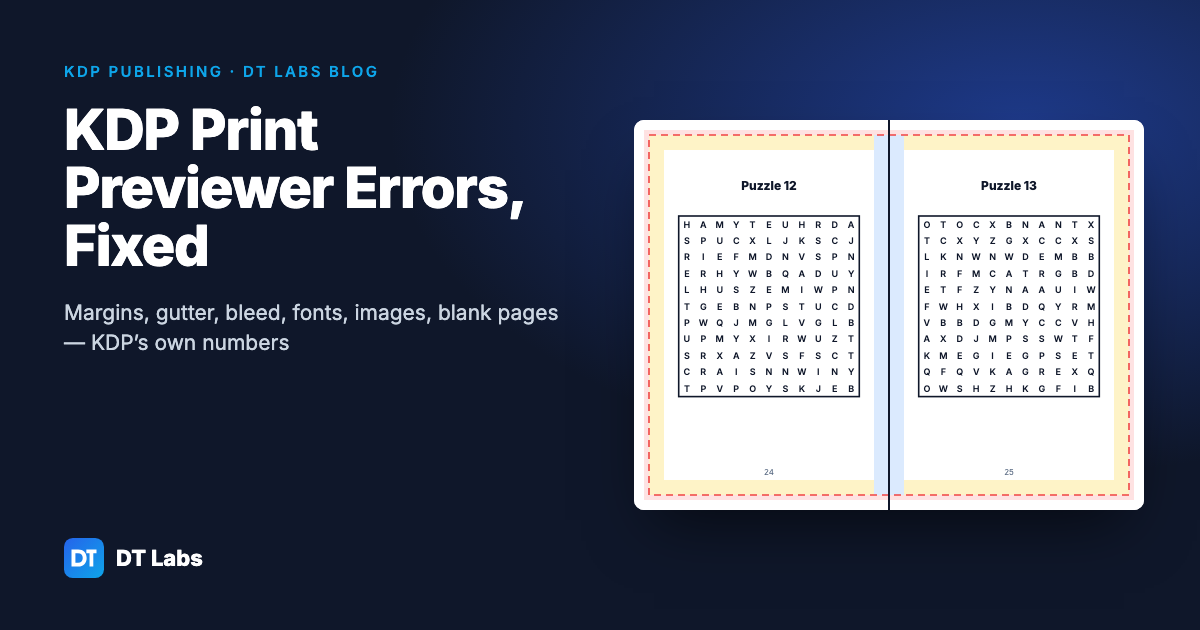
When KDP rejects a paperback interior, it is almost always one of nine things: the PDF page size doesn't match the trim size, content sits in the margin, the gutter is too narrow for the page count, bleed is set up wrong, a font isn't embedded, an image is under 300 DPI, there are too many blank pages, the file has leftover objects KDP doesn't accept, or the cover doesn't match the interior. Each one has a fixed number behind it, and every fix happens in the program you made the book in — not in the PDF.
In short: open Print Previewer, note which error and which pages, fix it in your original file, export a fresh PDF and upload again. The numbers below are taken from KDP's help pages as they read on 5 November 2026; KDP can change them, so check the linked pages before you publish.
How KDP checks your file
There are two checks. Print Previewer runs automatically when you upload and flags problems on the pages where it finds them; you can't submit until the blocking errors are gone. Then, after you submit, people at KDP review the interior and cover. If they find something, you get an email with links to the problem pages in Print Previewer.
Two things worth knowing before you start fixing:
- Previewer sometimes tries to fix a file itself by scaling pages to fit the margins. A book that "passed" this way can come out with uneven page sizes or tiny text — always look at the preview, not just the error count.
- Previewer reads the structure of the PDF, not just what you see. A space, an empty text box or an invisible object can trigger an error on a page that looks clean.
The error table
| What Previewer or the email says | What it usually means | The fix |
|---|---|---|
| Page size doesn't match trim size | You picked 6 × 9 in KDP but exported Letter or A4, or exported with bleed when the book is set to no bleed (or the reverse) | Export at exactly the trim size; with bleed, trim width + 0.125" and trim height + 0.25" |
| Text or images outside the margins | Something sits closer than 0.25" to the top, bottom or outside edge — often a page number, a footer, or a puzzle grid | Move it inside the margins; make margins slightly larger than the minimum |
| Content in the gutter | The inside margin is narrower than KDP's minimum for your page count | Widen the inside margin to the value for your page count (table below) |
| Increase bleed / images don't reach the edge | A background or border is meant to run off the page but stops at the trim line | Set the whole file up with bleed and extend those images 0.125" past the trim |
| Fonts not embedded | The PDF was exported without embedding, or the font's licence doesn't allow embedding | Export with "embed all fonts"; if it still fails, switch to a font licensed for commercial use |
| Low resolution images | An image is under 300 DPI at the size it prints | Replace it with a 300 DPI version at print size; don't enlarge small images |
| Too many blank pages | More than 4 blank pages in a row at the start or middle, or more than 10 at the end | Remove them, or add a "This page intentionally left blank" line or a notes heading |
| Text too small or unreadable | Text under 7 pt, or light text on a busy background | 7 pt minimum; keep text on a plain area |
| Template / placeholder text | "Lorem ipsum", "Your title here" or a template's sample pages left in | Delete every placeholder before you export |
Page size and trim: the most common rejection
Your PDF page must match the trim size you chose in KDP — exactly. A 6 × 9 book exported on US Letter paper is rejected straight away.
If your book uses bleed, the page is a little bigger than the trim, because KDP cuts 0.125" off the top, bottom and outside edge (not the spine edge):
- Page width with bleed = trim width + 0.125"
- Page height with bleed = trim height + 0.25"
So a 6 × 9 book with bleed is a 6.125 × 9.25 in PDF, and an 8.5 × 11 book with bleed is 8.625 × 11.25 in. KDP also says that if even one page needs bleed, the whole file should be set up with bleed — and the bleed setting you pick in KDP has to match the file.
Most puzzle books and plain-text books don't need bleed at all. Turning bleed off, and keeping everything inside the margins, removes a whole class of errors.
Margins: the four edges are not the same
KDP sets different minimums for the inside edge and the other three.
Top, bottom and outside: at least 0.25" without bleed, at least 0.375" with bleed. KDP suggests going a little over the minimum, because italic letters and some fonts reach slightly past their text box.
Inside (gutter): grows with page count, because a thicker book curls more into the spine.
| Page count | Minimum inside margin |
|---|---|
| 24–150 | 0.375" (9.6 mm) |
| 151–300 | 0.5" (12.7 mm) |
| 301–500 | 0.625" (15.9 mm) |
| 501–700 | 0.75" (19.1 mm) |
| 701–828 | 0.875" (22.3 mm) |
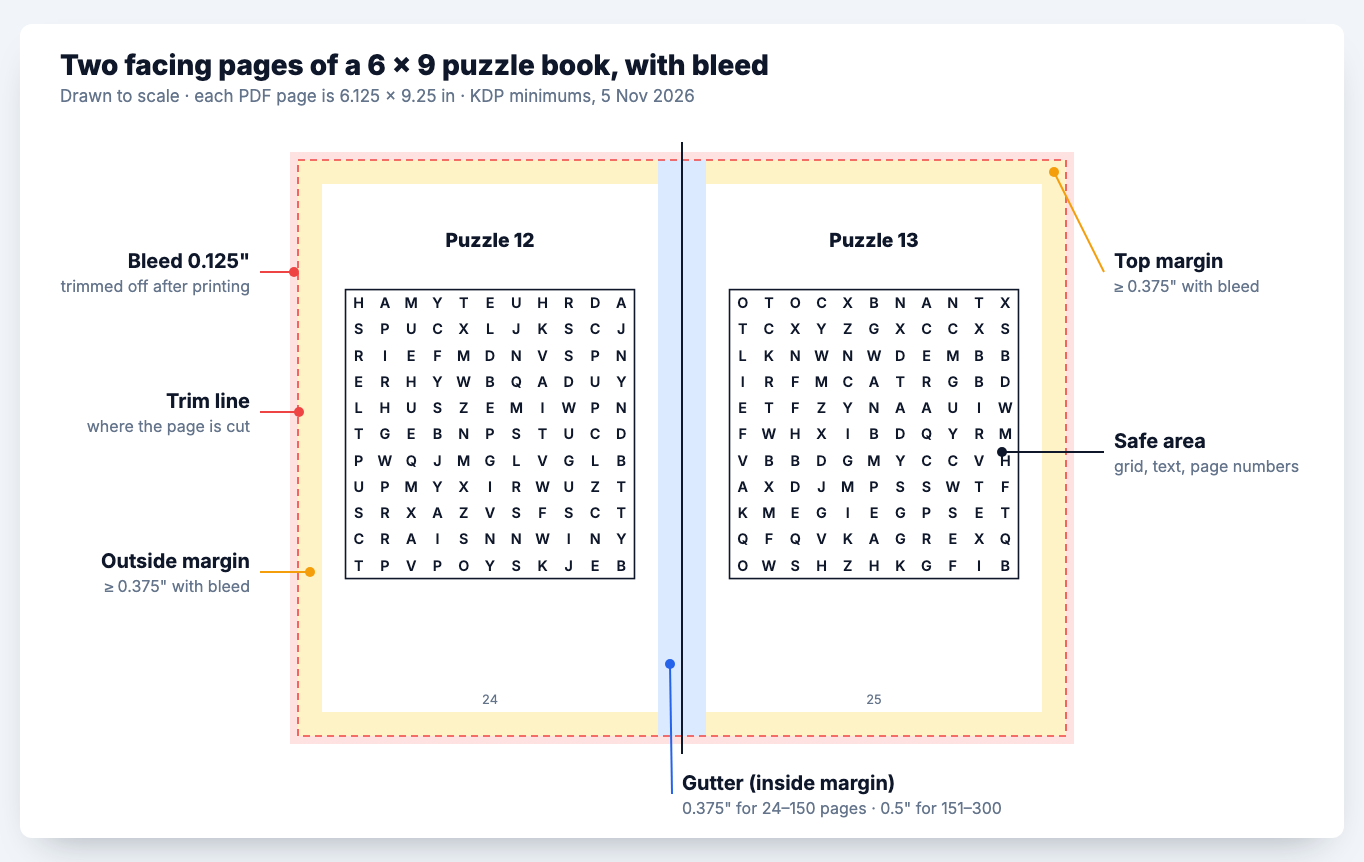
The trap is page count changing after you set the margins. Add answer pages to a 140-page puzzle book and it becomes 160 pages — now it needs a 0.5" gutter, and every page that was fine before fails. Set the gutter for the final page count, or simply use the next band up from the start.
Some guides recommend wider gutters for puzzle books (0.75" and more). That's a style choice for easier writing near the spine, not a KDP rule — the table above is what KDP checks. There's a fuller version with trim sizes and Word settings in our KDP margins and trim size guide.
In Word: Layout → Margins → Custom Margins, set "Multiple pages" to Mirror margins, apply to Whole document, and put your inside margin in Inside. KDP's help asks you to use the same value for the inside margin and the gutter setting, so you don't add the space twice.
Fonts: embedded, and allowed to be embedded
KDP asks for every font to be embedded in the PDF. Most programs do this when you choose "PDF (best for printing)" or "Press quality", but not when you print to PDF with a basic driver.
If you embedded everything and Previewer still reports unembedded fonts, KDP's help explains the likely cause: some fonts don't allow commercial use, and that blocks embedding. Free "personal use only" fonts from font sites are the usual culprits. Switch to a font with a licence that allows commercial use and embedding (fonts under the SIL Open Font License, for example) and export again.
Images: 300 DPI at the size they print
KDP's minimum is 300 DPI and it recommends no more than 600. DPI depends on print size: a 1500 × 1500 px image is 300 DPI at 5 × 5 inches, but only 150 DPI stretched across a full 10-inch page. Don't scale small images up — it raises the number in the file but not the detail.
Two quieter causes of image errors:
- Compression on export. Word and some PDF tools downsample images. Turn compression off before you export.
- Transparency. KDP asks you to flatten transparent objects and layers before you make the PDF. Exports from design tools with soft shadows or semi-transparent PNGs can fail or print oddly.
Line art made as vector (lines and shapes, not pixels) has no DPI problem at all; it stays sharp at any size.
Blank pages and page numbers
KDP allows at most 4 blank pages in a row at the start or in the middle of a book, and 10 in a row at the end. Notebooks, journals and puzzle books with "notes" pages hit this often. A heading ("Notes"), a light line pattern, or "This page intentionally left blank" makes a page count as not blank.
Page numbers have to run in order. If you skip numbers on the title page and contents, use section breaks rather than deleting numbers by hand.
File clean-up KDP asks for
From KDP's paperback submission guidelines:
- Single pages, not two-page spreads.
- No crop marks, trim marks, comments, bookmarks, annotations or hidden objects.
- Not locked or password-protected.
- 650 MB or less.
- A file name without emoji or unusual symbols.
If a file keeps failing for reasons you can't see, KDP's help suggests a blunt reset for text-only books: save the text as plain text, which drops all formatting, and lay it out again.
Puzzle, coloring and activity books: the extra traps
Low-content and activity books fail for the same reasons as novels, but in their own ways:
- Grids to the edge. A word search or sudoku grid scaled to "fill the page" lands in the outside margin. Size the grid to the space inside the margins, not the page.
- Decorative borders. A frame around every page is fine inside the margins. If it's meant to run off the edge, the book needs bleed — and the border must extend 0.125" past the trim.
- Answer pages change the gutter. Adding a solutions section can push a book into the next gutter band.
- Coloring pages in the gutter. Single-sided coloring books put art on right-hand pages; the art still has to clear the inside margin of that page.
- Spine text under 79 pages. KDP doesn't allow text on the spine of books under 79 pages. Leave the spine blank on short activity books — see the KDP cover size guide and the spine width calculator.
- Trim size choice. 8.5 × 11 suits large-print and kids' puzzle books; 6 × 9 suits travel-size. The trim size guide for puzzle books compares them.
The DT Labs makers (free to use and preview; clean interiors with DT Labs Membership) — the word search maker, sudoku generator, mandala maker and others — export interiors with these rules built in: the gutter is 0.5 in, which covers KDP's minimum for books up to 300 pages, and the export check compares it with KDP's minimum for your page count, fonts are embedded (Liberation Sans, under the SIL Open Font License), puzzles are drawn as vector lines, and nothing runs into the bleed. You still choose the trim size in KDP to match, and you should still look at every page in Previewer.
Before you upload: a checklist
- PDF page size = trim size (or trim + 0.125" wide, + 0.25" tall with bleed).
- Bleed setting in KDP matches the file.
- Top, bottom and outside margins ≥ 0.25" (≥ 0.375" with bleed), with a little extra.
- Inside margin matches the final page count.
- Page numbers, headers and footers inside the margins.
- All fonts embedded and licensed for commercial use.
- Images 300 DPI at print size, compression off, transparency flattened.
- No more than 4 blank pages in a row (10 at the end).
- No placeholder text, crop marks, comments or hidden objects.
- Single pages, not spreads; file under 650 MB; not password-protected.
- Title, author and ISBN in the file match what you entered in KDP — see ISBN barcodes for KDP.
- Previewer checked page by page — then order a printed proof. The screen preview can't show how a gutter feels in your hand.
Sources
- KDP Help: Fix Paperback and Hardcover Formatting Issues — kdp.amazon.com/en_US/help/topic/G201834260
- KDP Help: Set Trim Size, Bleed, and Margins — kdp.amazon.com/en_US/help/topic/GVBQ3CMEQW3W2VL6
- KDP Help: Paperback Submission Guidelines — kdp.amazon.com/en_US/help/topic/G201857950
All read on 5 November 2026. DT Labs is not affiliated with Amazon or KDP.
Frequently asked questions
Why does KDP say my text is outside the margins when I can't see anything there?
Print Previewer reads the file's structure, so a space, an empty text box or an invisible object near the edge counts as content. Italic letters can also reach a little past their text box. Remove hidden objects and make the margins slightly larger than KDP's minimum.
What margins does KDP require?
At least 0.25" on the top, bottom and outside edges without bleed, or 0.375" with bleed. The inside margin depends on page count: 0.375" for 24–150 pages, rising to 0.875" for 701–828 pages.
How big should my PDF be with bleed?
Trim width plus 0.125" and trim height plus 0.25". A 6 × 9 book with bleed is a 6.125 × 9.25 in PDF; an 8.5 × 11 book is 8.625 × 11.25 in.
How do I fix "fonts not embedded" on KDP?
Export the PDF with all fonts embedded (for example "PDF – best for printing" or "Press quality"). If the error stays, the font's licence probably doesn't allow embedding for commercial use — switch to a font that does and export again.
How many blank pages does KDP allow?
No more than 4 blank pages in a row at the beginning or middle of the book, and no more than 10 in a row at the end.
Do puzzle books need bleed on KDP?
Usually not. Bleed is only needed when something prints right to the edge of the page. Puzzle grids and text kept inside the margins don't need it, and leaving bleed off avoids several errors.
Chrome Extensions for KDP Research Compared: What Each One Shows, Costs and Covers
Nine KDP research extensions compared: what each shows on Amazon, price checked 5 Nov 2026, free tiers, Etsy support and data collected.
Nov 5, 2026 · 9 min read
Canva or a Puzzle Generator for a KDP Puzzle Book? What Each Does Well
Canva or a puzzle generator for a KDP puzzle book? Bleed, crop marks, gutters, valid puzzles, answer keys and Canva's licence, compared fairly.
Nov 5, 2026 · 7 min read
KDP Niche Research: How to Check a Niche Before You Make the Book
Check a KDP niche before you make the book: are new books ranking on page one, and is a top result one buyers dislike? A step-by-step method.
Nov 4, 2026 · 6 min read